To fix the issue with missing letters in a document:
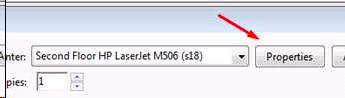
Click print, go under “Properties”
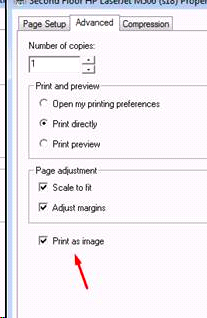
And then in the “Advanced” tab, check for box for “Print as image”
***This works for PDFs with B/Stamps too
To fix the issue with missing letters in a document:
Click print, go under “Properties”
And then in the “Advanced” tab, check for box for “Print as image”
***This works for PDFs with B/Stamps too
Comments
1 comment
I know we have a workaround, but is this bug ever going to be fixed? It is pretty frustrating to not realize there was a missing letter until you're sitting in a deposition.
Please sign in to leave a comment.