Skip to main content
How to manually enter postage
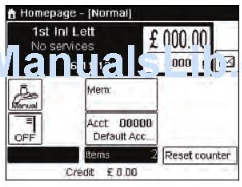
- Go to the home screen of the normal type of imprint
- The home screen indicates weight, postage and currently selected rate as illustrated below:
- Check or change the type of imprint.
- Press
 and type 1 to access the Imprint Screen.
- The type of imprint is indicated on line 2 of the screen.
- To change the type of imprint:
- Select the "Imprint Type" line
- Press "OK" and select [manual amount of entry] in the Imprint Screen
- Press "OK"
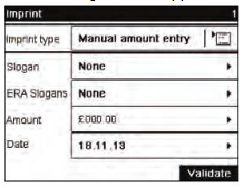
- The following screen appears:
- Change the elements of the imprint
- To check or change the Slogan selection:
- Select "Slogan"
- Select a "Slogan" or "None" in the Select Slogan Screen.
- To add or change the ERA:
- Select "ERA Slogans"
- Select an ERA (or "None") in the ERA Slogans screen.
- To add or change the amount manually:
- Select Amount
- The Manual Amount Entry screen appears:
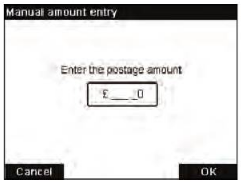
- Enter the desired amount
- Press "OK"
- If needed, change the date or date format
- Select "Date"
- Select a date option in the "Date advance" screen
- Select "No date advance" to print current date
- Press
 or
or  to return to the Home Screen
Comments
0 comments
Please sign in to leave a comment.